





Why A-Brand refurbished systems?
Pay for the computer you need, not the one you want?
It's time to buy a new computer or server, but what do you get? One that does "what you want it to do", or one that does "what you need it to do"?
 You want to get a top-of-the-line machine that
can wow with its speed, power, and digital agility but you'll
need to drop a large wad of cash to get it. New top-of-the-line
is nice, but let's look at the economic reality, new
top-of-the-line is more often than not just out of reach for
many SOHOs and entrepreneurs. The "latest and greatest" computer
or server on the market could easily rival the cost of a good
used car and are only the "latest" for about six-months! Add
depreciation and it gets really depressing. If a reseller starts
upselling and says you need it to run Windows 35, it is just not
true. It is all about moving expensive boxes that mean you need
to buy expensive software!
You want to get a top-of-the-line machine that
can wow with its speed, power, and digital agility but you'll
need to drop a large wad of cash to get it. New top-of-the-line
is nice, but let's look at the economic reality, new
top-of-the-line is more often than not just out of reach for
many SOHOs and entrepreneurs. The "latest and greatest" computer
or server on the market could easily rival the cost of a good
used car and are only the "latest" for about six-months! Add
depreciation and it gets really depressing. If a reseller starts
upselling and says you need it to run Windows 35, it is just not
true. It is all about moving expensive boxes that mean you need
to buy expensive software!
Many people still run Windows XP
and Windows 7 but have been left behind in security terms.
INFERNO©™ recommend A-Brand (HP/Dell/Lenovo) refurbished systems as the logical second step in the buy-decision process. It is the second step because the first step should always be define what you need to do (not how fast you want it to be). Although, we offer the HP thin client T520 as the INFERNO©™ base refurbished model, we always supply a model which meets the functional expectations. It is used here as the INFERNO©™ Model A guideline.
Any computer hardware that does what you need to do for a reasonable price is win, win, win all the way. It's the choice I made for myself and my companies many years ago.
Refurbished INFERNO©™ computers don't just save you money; they come loaded with features and are an excellent basis for many networking, office and server tasks.
Refurbished, what does it mean?
When some people hear the "refurbished", they think it means that a refurbished computer is the same as a second-hand computer. Refurbished computers are machines which were returned, for example, at the end of a lease. They are sold to a wholesale reseller, inspected, cleaned, upgraded, repaired, graded and resold by the wholesale reseller. There is no data, malware or viruses on refurbished INFERNO©™ computers because the HDD or SSD are wiped or often replaced.
A used computer or server on the other hand, is just that; a computer of dubious origin that has been used. It is not inspected for defects, or wiped, and buying one is done under the rule "buyer beware" with no warranty.
 Green is good. We are all citizens of the
world and the world is our community. INFERNO©™
continuously review our eco-footprint to ensure our impact is as
small as possible. Computers are full of nasty chemicals.
Refurbished computers are a giant green step; adding them to the
circular economy ensures usable hardware is not dumped in
land-fill, at sea or a third world countries. Join us.
Green is good. We are all citizens of the
world and the world is our community. INFERNO©™
continuously review our eco-footprint to ensure our impact is as
small as possible. Computers are full of nasty chemicals.
Refurbished computers are a giant green step; adding them to the
circular economy ensures usable hardware is not dumped in
land-fill, at sea or a third world countries. Join us.
Who buys refurbished computers?
Some people want a new computer and have the means to do so regardless of the price so they don't often buy refurbished computers. People who want good technology, reliability, and performance but aren't willing to drop top dollar to get it look to refurbished computers and servers as their solution.
INFERNO©™ refurbished systems enable entrepreneurs, operating within tight budgets, to save money without sacrificing much in the way of performance at the low end of the market. Most people just wanting cheap reliable computers and networking devices also see refurbished computers as an attractive option. Especially, if they would rather not spend any of money on a computer and are risk-averse.
Refurbished computers and servers come in three different grades which are assigned during the refurbishing process.
A-grade refurbished computer or servers are computers that show no significant superficial signs of wear or use and function flawlessly with relatively new performance metrics. A-grade systems are mainly sold through the manufacturer's web outlet shop.
B-class refurbished computer or servers with cosmetic imperfections such as scratches on the screen, worn keys on the keyboard, or minor dings in the shell.
C-class refurbished computer or servers show significant signs of wear.
In all cases INFERNO©™ systems are loaded with an up-to-date Linux operating system, the required programs for the selected application and security enhanced.
A Few Hidden Benefits
 The under-the-radar benefits of refurbished
computers in addition to the lower price can include
installation of a secure operating system and updated software.
The refurbished computer or servers are also closely inspected
and tested before they are repackaged and shipped. When you buy
a refurbished INFERNO©™
computer or server you know the machine has been verified to
work as expected while providing the optimum security for the
application.
The under-the-radar benefits of refurbished
computers in addition to the lower price can include
installation of a secure operating system and updated software.
The refurbished computer or servers are also closely inspected
and tested before they are repackaged and shipped. When you buy
a refurbished INFERNO©™
computer or server you know the machine has been verified to
work as expected while providing the optimum security for the
application.

T520 Product description
Why do I need a technical Dodo?
While low-cost thin clients such as HP's T520
have passed their commercial "use by" they are not a technical
Dodo by any means. They still carry a lot of modern tech such
as 1 GB networking, Hi-Res dual-display DisplayPort, USB 3.0,
and so on.
They are put out to pasture
because the manufacturers have new models to sell and have
pulled the support on these models
The T520 is based on an AMD System-On-a-Chip (SOC) processor with a TDP of 6W. It has a host of onboard features. The CPU is a dual core 64-bit processor running between 1GHz and 1.4GHz in 100MHz steps. The Thin Client Reference documentation can be found here
The T520 motherboard is slightly unusual in
that there are hardly any internal connectors or unpopulated
sections of the board. The Flash SSD memory is easily
replaceable. It's an M.2 SSD. (the white label towards the top
left in the photograph). There are no standard SATA sockets on
the board. The M.2 slot only seems to have SATA routed to it,
which from a cost point of view is good because M.2 SATA
drives are cheaper anyway but it does mean that NVME SSDs are
not supported. The board also has mounting holes for 2242 and
2260 SSDs.
RAM is a standard 204-pin DDR3 SODIMM and the HP documentation
for the SODIMM quotes "industry-standard 204-pin, unbuffered
non-ECC PC3-12800 DDR3-1600 MHz-compliant or non-ECC
PC3L-12800 DDR3L-1600 MHz-compliant,DDR3-SDRAM SODIMM, 1.35 V
DDR3L-SDRAM (preferred) or 1.5 V DDR3-SDRAM with CAS latency 9
DDR3 1333 MHz (9-9-9 timing). In addition, the thin client
supports 2 GB, 4 GB, and 8 GB non-ECC memory technologies,
either single-sided and double-sided SODIMMS. However, SODIMMs
constructed with x8 and x16 devices; SODIMMs constructed with
x4 SDRAM are not supported".
The T520 has a Mini-PCIe 1x Slot next to the M.2 connector pointing towards the edge of the board which only accepts boards 28 mm deep (maximum). It is used for small Wireless LAN cards common in most laptops.
Two USB3.0 sockets on the front panel and four USB2.0 sockets on the rear panel are available.
The two dual-mode DisplayPort 1.2 ports and the VGA socket on the rear panel cover most types of display output but DisplayPort to HDMI converters are readily available. T520 supports two independent displays. The devices connected at boot or disconnected during use determine which video ports are enabled and which is disabled.
If the VGA port is connected at boot, only one DisplayPort port can used. If the VGA device is disconnected, then both DisplayPort ports are enabled. If a VGA device and one DisplayPort device are connected at boot up, then the other DisplayPort port is disabled. If the VGA device is disconnected, then that DisplayPort port is enabled.
If two DisplayPort devices are connected at boot up, then the VGA port is disabled. If one or both DisplayPort devices are disconnected, the VGA port is enabled.
:There are a number of Jumpers on the board. The blue jumper on it (labelled PSWD) is there to clear any set password. The usual HP procedure is to power off, remove the link, power up briefly, power off and replace the jumper. FDO - Flash Descriptor Override apparently used for updating on the Intel Management Engine. BB and BBR - Boot Block and Boot Block Recovery (a BIOS recovery mechanism).

T520 Specifications
Refurbished multi-purpose workhorse
| Processor | |
|---|---|
| Type | 64-bit AMD GX-212JC, dual-core integrated chipset |
| Speed (GHz) | 1.2 to 1.4 |
| Memory | |
| SDD Flash | 14 GB (M.2 SATA) |
| RAM | 4 GB (std), 8 GB DDR3-SDRAM SODIMM (max) |
| Back-up storage | SDHC Flash SanDisk UHS-I 32 GB |
| Video | |
| Chip | Radeon R2E |
| Outputs | Display Port 1.2 |
| VGA | |
| Resolution (max) | 2560 x 1600 dpi (Display Port) |
| Network | |
| Ethernet | eth0: up to 1 GB |
| optional USB-3 | eth1: up to 1 GB |
| WiFi optional | wlan0: USB dual-band 2.4/5.0 GHz 802.11ac (WiFi5) using Realtek chipset |
| Other connections | |
| USB | 2 x USB 3.0 port |
| 4 x USB 2.0 port | |
| Audio | 3 mm stereo mini jack on front panel marked as headphone |
| 3 mm stereo mini jack on front panel marked as microphone | |
| Power | |
| Input supply | 3.33 A @ 19.5VDC using power block (SUPPLIED) |
| Plug type (mm) | 7.4 x 5 Coax with central pin |
| Off | 0.5 W |
| Idle | ~6 W |
| Running | 10 W (typical) |
| Maximum | 65 W (under full load) |
| Dimensions (mm) | |
| H x W x D | 200 x 45.1 x 200 (Excluding Stand) |
| Miscellaneous | |
| Hewlett Packard | Thin Client Reference Documentation, including safety certifications |

So, what's this Raspberry Pi4 thing?
A short guide to the Raspberry Pi4
 The Raspberry Pi 4 offers ground-breaking
increases in processor speed, multimedia performance, memory,
and connectivity compared to the prior-generation boards, in a
low-cost package. The Raspberry Pi 4 Model B is the latest
iteration of the Raspberry Pi Foundation's Small Board Computer
(SBC). It has a high-performance quad-Core 64-bit Broadcom 2711,
Cortex A72 1.5GHz speed processor. This processor uses 20% less
power with 90% greater performance than the previous model.
However, this is at the cost of heat generation so it is very
important to ensure sufficient cooling to prevent
processor-throttling.
The Raspberry Pi 4 offers ground-breaking
increases in processor speed, multimedia performance, memory,
and connectivity compared to the prior-generation boards, in a
low-cost package. The Raspberry Pi 4 Model B is the latest
iteration of the Raspberry Pi Foundation's Small Board Computer
(SBC). It has a high-performance quad-Core 64-bit Broadcom 2711,
Cortex A72 1.5GHz speed processor. This processor uses 20% less
power with 90% greater performance than the previous model.
However, this is at the cost of heat generation so it is very
important to ensure sufficient cooling to prevent
processor-throttling.
The Raspberry Pi 4 comes in three on-board RAM options for even further performance benefits: 2GB, 4GB and 8GB LPDDR4 SDRAM. Other features include dual-display support up to 4k resolution, hardware video decodes at up to 4Kp60, dual-channel 2.4/5.0GHz wireless LAN (WiFi4), true Gigabit Ethernet, two USB 3.0 ports, Bluetooth 5.0, and PoE capability (via a separate PoE HAT board).
Overall, the Raspberry Pi 4 uses more power than the previous SBCs and requires a minimum power supply of 3.0 A, 5 VDC USB-C but it's maximum power consumption is tiny under load at 10 W.
Ok, so what can it do for me?
Some say the Raspberry Pi 4 provides desktop performance comparable to entry-level systems, and others say a Chromebook is better. But INFERNO©™ say it is perfect for small sever and network security applications plus all the things a Chrombook, tablet or base-level laptop are used for without the Google or Microsoft "telemetry".
The Raspberry Pi 4 due to its extremely small size can be put into or onto a whole range of case designs enabling true design creativity to be applied.
Standard HDMI ports are not available on the Raspberry Pi 4. They are replaced by two micro-HDMI ports to provide dual monitor support. INFERNO©™supply the Argon ONE v2 case ensuring standard HDMI cables can be connected for ease of use.
The GPIO pin outs can be found here or here and the schematic diagram here
Argon ONE v2 Case for Raspberry Pi 4
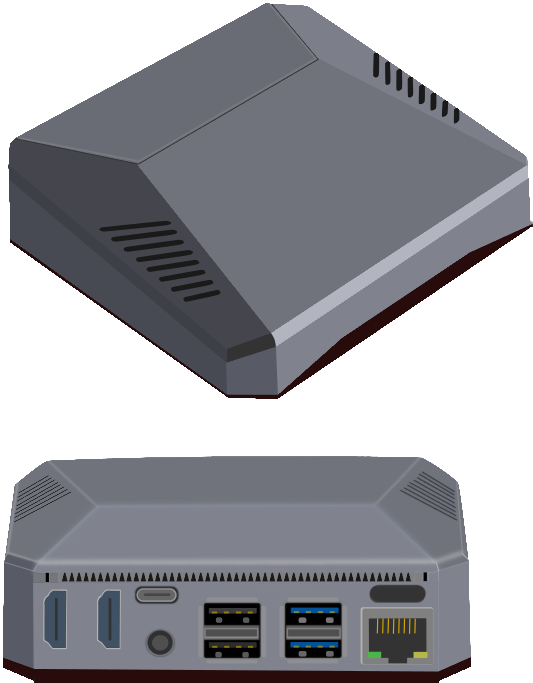 The Argon one aluminum case cools the
Raspberry Pi by acting as a heatsink and comes with a 30 mm
temperature controllable fan. All ports on the rear of the case
minimizing clutter and makes cable management easy. The power
button can perform a safe shutdown, reboot, or forced shutdown
depending on the length of time the button is pressed.
Additionally, two full-sized HDMI ports, and IR for remote
functionality make the case ideal for media centers. The GPIO
pins are accessible on top of the case and protected by a
removable magnetic cover.
The Argon one aluminum case cools the
Raspberry Pi by acting as a heatsink and comes with a 30 mm
temperature controllable fan. All ports on the rear of the case
minimizing clutter and makes cable management easy. The power
button can perform a safe shutdown, reboot, or forced shutdown
depending on the length of time the button is pressed.
Additionally, two full-sized HDMI ports, and IR for remote
functionality make the case ideal for media centers. The GPIO
pins are accessible on top of the case and protected by a
removable magnetic cover.

RPi4/Argon ONE Specifications
Flexible Quad-Core SBC for dedicated applications
| Processor | |
|---|---|
| Type | 64-bit BCM2711, Cortex-A72 (ARM v8) quad-core |
| Speed (GHz) | 1.5 |
| Memory | |
| RAM (LPDDR4) | 4 GB or 8 GB (2 GB version on request) |
| USB Flash | SanDisk Cruzer Blade 128 GB |
| Back-up storage | SDHC Flash SanDisk UHS-I 32 GB |
| Video and camera | |
| Outputs | 2 × micro-HDMI ports |
| camera port: 2-lane MIPI CSI | |
| display port: 2-lane MIPI DSI | |
| Multimedia | |
| H.265 | decode: 4Kp60 |
| H.264 | decode: 1080p60 |
| encode: 1080p30 | |
| Other | graphics: OpenGL ES, 3.0 |
| Resolution (max) | decode 4Kp60 (micro-HDMI) |
| Network | |
| Ethernet | eth0: 1 GB |
| eth1: up to 1 GB | |
| Wireless | wlan0: Dual band 2.4/5.0 GHz up to 802.11ac (WiFi5) |
| Bluetooth 5.0, BLE | |
| Other connections | |
| USB | 2 × USB 3.0 ports |
| 2 × USB 2.0 ports | |
| GPIO | Standard 40-pin GPIO header |
| Audio | 4-pole stereo audio and composite video port |
| Power | |
| Input supply | 3.1 A (minimum) @ 5 VDC using USB-C power block (SUPPLIED) |
| 3.1 A (minimum) @ 5 VDC using the GPIO header (not recommended) | |
| Power over Ethernet (PoE)–enabled (requires PoE HAT and Injector, NOT SUPPLIED) | |
| Off | 0.0 W |
| Idle | 4.4 W |
| Running | 6.4 W (typical) |
| Maximum | 10 W (under full load) |
| Dimensions (mm) | |
| H x D x L | 14.3 x 54 x 86.6 (Excluding case) |
| Miscellaneous | |
| Raspberry Pi4B | Get the Official Raspberry Pi4B Datasheet |
| Product approvals | Local and regional product approvals list |
| Production lifetime | The Raspberry Pi 4 Model B will remain in production until at least January 2026. |
| Argon ONE v2.0 Case | |
| Materials | Aluminum (top) and plastic (bottom) |
| Description | The Argon ONE v2.0 aluminum case cools the Raspberry Pi
by acting as a heatsink and comes with a 30 mm temperature
controllable fan. All ports on the rear of the case minimizing clutter and makes cable management easy. The power button can perform a safe shutdown, reboot, or forced shutdown depending on the length of time the button is pressed. Additionally, two full-sized HDMI ports, and IR for remote functionality make the case ideal for media centers. The GPIO pins are accessible on top of the case and protected by a removable magnetic cover. |
 Go here
for Configuration information
Go here
for Configuration information